
A lantern festival is planned backwards from its opening night. The design, the fabrication, the freight and the installation are four separate stages with their own deadlines, and none of them can move the date. What it looks like from the outside is an art project; inside, it is a supply chain with a fixed, unmovable opening night.
That combination is rare and brutal. A software launch can slip two weeks. A product drop can be rescheduled. A ticketed winter light festival that opens on 28 November cannot slip to 12 December — the venue is booked, the marketing is spent, the school groups are scheduled, and the refund exposure is real. Every other decision in the project is downstream of that one date.
Over the last few years the scale of these events has grown faster than the planning habits behind them. A mid-size municipal light festival that used to involve 30 lantern sets now routinely involves 80 to 150, plus interactive elements, projection mapping, food and beverage, security, and a ticketing integration. The number of vendors has grown with it: fabricators, freight forwarders, rigging crews, electrical contractors, and the venue’s own operations team.
Most festival teams are still running that complexity out of a spreadsheet, a group chat, and someone’s inbox. It works — right up until it doesn’t.
What makes a lantern festival different from any other event
What makes lantern and light festival projects structurally different
Three characteristics separate festival delivery from ordinary project management, and they are exactly what should drive your software choice.
Fabrication happens months before installation, and usually on another continent. For custom lantern work, the design-to-install timeline commonly runs 4 to 7 months: concept and 3D design, engineering and frame fabrication, silk stretching and painting, crating, 6 to 8 weeks of sea freight, customs clearance, then on-site assembly. A task board that only tracks “installation” is tracking the last 12% of the project. The tool has to hold the manufacturing phase as first-class work, with milestone dates tied to shipping cutoffs rather than to internal meetings.
Every element is a physical asset with a lifecycle, not just a task. A 4-metre lantern set is specified, prototyped, photographed, crated, shipped, installed, maintained through a 60-night run, then either stored or refurbished. That is an asset record, not a to-do item. If your tools cannot hold “this is lantern set 47, here is its crate number, here is where it is stored” you will be rebuilding that information from memory every season — and for touring or annually recurring festivals, that memory loss is where the budget quietly leaks.
The team is a temporary organisation. The festival committee, the city liaison, the external fabrication partner and the on-site rigging crew will probably never work together again. Onboarding cost is therefore a recurring cost, not a one-off. Tools that need three days of training per new collaborator are more expensive than their licence fee suggests.
The real cost of getting the sequence wrong
The failure mode is not dramatic. It is slow and expensive.
- Version drift. The lantern count in the design deck says 94. The procurement sheet says 88. The freight manifest says 91. Nobody knows which is right, and the discrepancy is discovered on site.
- Decisions without context. The choice to drop two interactive pieces was made in a voice note in week 9. In week 22 nobody remembers why, so the same debate happens again.
- Critical path invisibility. Customs clearance is the single highest-risk step in an international lantern project, and in a spreadsheet it is one row among two hundred, with no visible dependency on anything.
- Handover amnesia. Next year’s team inherits a folder, not a system, and relearns everything from scratch.
None of this is a tooling problem in the abstract. It is a visibility problem — and it is the reason the order of decisions matters more than the tools used to track them.
The four stages every lantern festival runs through
Stage 1 — Concept and site (months 1–2)
Decide what the site can actually hold before anything is drawn. Clear height, viewing distance, evacuation routes and the weight the ground can take set the outer limit, and every later decision is constrained by them. Deliverable: a signed-off zone plan with dimensions, not a mood board.
Stage 2 — Design and fabrication (months 2–4)
This is where the schedule is won or lost, and it is the stage most teams under-manage. Each piece moves through design approval, engineering, frame building, surfacing and quality check, and each step has an owner. Deliverable: a photographed record of every item at every stage.
Stage 3 — Freight and clearance (months 4–5)
The least compressible stage, and the one that most often moves an opening night. Book the vessel before fabrication finishes rather than after, and treat clearance as a milestone with its own buffer. Deliverable: a document set the receiving agent can act on without asking questions.
Stage 4 — Installation and run (months 5–6+)
Installation is a sequence, not a day. Electrical points, anchoring, sight-line checks and a full lighting test each need their own slot, and sites usually only release parts of the route at a time. Deliverable: a snag list closed before the first ticket is sold.
Three project types, three different plans
A lantern festival is not one product. The plan changes with the site, and these three cover most of the work we see. Each has a full planning guide behind it.
▸ Public park or botanical garden
A walking route through mature planting, with a fixed opening date that cannot move because tickets are already on sale. The constraint is the route: density has to carry visitors past the dark stretches without narrowing the path.
How that route is worked out in practice is set out in our guide to planning a Christmas lantern festival for a public park.
▸ Large-scale themed project
A single subject carried across an entire site — a fish theme, an ocean theme, a festival narrative. The constraint is consistency: 80 to 150 pieces have to read as one idea rather than 150 ideas.
How a single subject is carried across a whole site is set out in our guide to planning a large-scale fish lantern festival project.
▸ Mall, airport or retail installation
A commercial space with its own rules — wayfinding, fire lanes, tenancy agreements and a landlord who signs off on sight lines. The constraint is that the piece has to earn its floor space.
For the commercial case there are two guides: planning commercial art installations, and our work on commercial art installation for malls and airports.


What to track, and the tools that actually help
Most festival teams do not need a specialist platform. They need three things visible in one place: where each piece is, what still has to happen, and who decided what. These three tools cover that; the rest of the market duplicates them.
| Tool | What it owns | Why this one |
|---|---|---|
| Smartsheet | Build and installation tracking | One row per lantern set with dependency logic, so a customs delay shows as a red line against the opening date. |
| Airtable | The asset record | Dimensions, condition, storage location and photo history for every piece — what makes year two cheaper than year one. |
| Notion | Decisions and handover | The brief, approvals, meeting log and debrief. What a team reads when the people who ran it last year have moved on. |
For teams under 10 people running a single event, a free task board plus a shared document is enough. Between 10 and 50 people, separate the schedule from the asset record — one tool will not do both well. Above 50 people across multiple sites, the asset record becomes the master document and everything else links to it.
A practical stack for a 6-month lantern festival timeline
Tools matter less than knowing what to track in which phase. Here is a working division.
Phase 1 — Concept and design (months 1–2). Notion holds the brief, inspiration, zone plan and specification. Asana or Monday tracks design approvals with the client. Deliverable: a signed-off lantern list with dimensions and power requirements.
Phase 2 — Fabrication (months 2–4). This is the phase most teams under-manage. Airtable or Smartsheet holds one row per lantern set with design / frame / painting / QC status. Weekly photo updates attach directly to the record. Deliverable: a complete, photographically documented inventory before anything is crated.
Phase 3 — Freight and customs (months 4–5). Smartsheet’s critical path earns its keep here. Track crating completion, container booking, vessel departure, arrival, customs clearance and inland delivery as linked milestones with dependencies. Deliverable: a customs-clearance contingency of at least 10 working days that is visible on the Gantt, not hidden in someone’s head.
Phase 4 — Installation and run (months 5–6+). Switch to mobile-first tools. A Smartsheet or Airtable form lets on-site crews report damage or outages from a phone in under 30 seconds. Asana or Trello runs the nightly snag list. Deliverable: a maintenance log that feeds directly into next year’s refurbishment budget.
The pattern: documents in one place, assets in a database, schedule in a Gantt, and on-site reporting through a form. One tool rarely does all four well.
What we do differently: an AI-assisted client workspace
Every tool in this comparison is designed for one team managing itself. None of them solves the problem that causes the most friction in a cross-border lantern project: the client cannot see what is happening.
That gap is structural, not accidental. Your fabricator is 11,000 kilometres away, working in a different language, in a time zone that overlaps your working day by about two hours. Every week that passes without a clear status update creates a small amount of anxiety, and anxiety turns into status meetings, and status meetings turn into a calendar that nobody has time for. The tooling above does not fix this because the client is, in every one of these products, a guest with limited access to someone else’s system.
So we built the layer that sits between our factory floor and your planning team. We run our custom lantern projects inside an AI-assisted client workspace
What it actually does
One live record per lantern set. Every element in your order — lantern set, archway, interactive piece — has its own record with a status that moves from design through engineering, fabrication, painting, quality control, crating, shipping, customs and installation. You open a link and see where all 87 pieces are. No software to install, no licence to buy, no training.
AI-assisted weekly updates. Our production team photographs the floor weekly. The system matches each batch of images to the right lantern record and generates a progress summary in English, so you get a written update without waiting for anyone to write one. This is the part that removes the meeting. The information arrives whether or not two calendars happen to overlap.
Milestone alerts with real lead time. Booking, vessel departure, arrival and customs clearance are tracked against the plan, and deviations raise a flag early — early enough that a three-week customs problem is still a manageable problem rather than an opening-night problem.
What it does not do
We are not going to tell you this replaces anything on the list above. It is not a planning engine and it does not run a critical path — internally we still manage the schedule in a proper Gantt, because that is the only honest way to hold a fixed opening date. The workspace is a visibility layer: it shows you the truth of the project without asking you to learn a tool.
It also does not change what matters most, which is starting early. A workspace that tells you clearly that your container is late is better than silence, but it is still worse than a container that was never at risk.
Why we did not just buy licences for our clients
We tried the obvious version first — invite clients into a commercial project tool as guests. Three things broke:
- Adoption. A venue operations manager will not learn a new tool for one project a year. The guest seat went unused and we were back to email.
- Cost. External seats add up fast on a project with a large stakeholder group, and that cost lands on the client for a tool they did not choose.
- Language and time zone. English-first interfaces and asynchronous handovers meant updates landed, but landed late and needed translation anyway.
A read-only workspace that requires no login discipline and arrives in the client’s own language solved all three. It is less sophisticated than Smartsheet and it is considerably more useful.
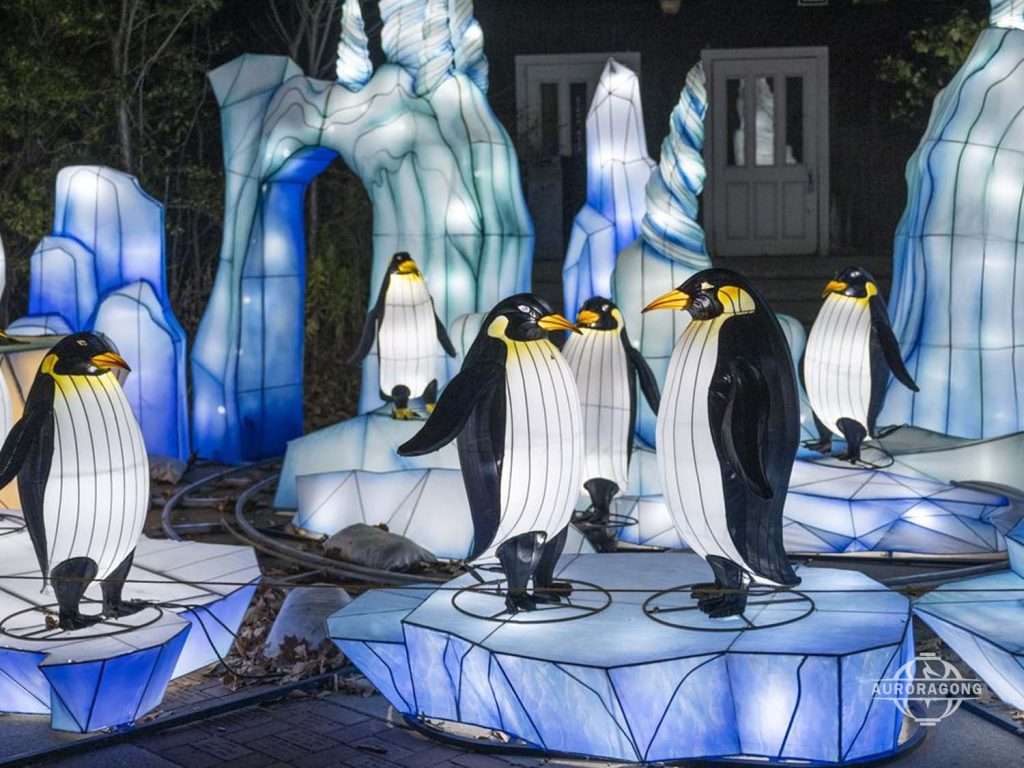
A penguin colony on an ice floe reads as one scene, not as five separate pieces. The platform, the spacing between the birds and the shared lighting are what hold it together — which is why a group like this is specified as a whole and not ordered piece by piece. It fills a quiet stretch of a route between two louder set pieces.
FAQ
What is the biggest mistake teams make when planning a lantern festival?
Treating it as a design project instead of a delivery project. Teams spend months on the look of the route and weeks on the schedule, when the date is set by fabrication and freight. The first decision is not what it should look like, it is when the first container has to leave.
Do we really need paid software, or is the free tier enough?
For under 10 users, free tiers from ClickUp, Trello, Asana and Notion will cover a genuine single-site event. Past roughly 15 users, paid tiers become worth it for three reasons: guest and vendor permissions, storage for photos and drawings, and the reporting that stops you chasing status manually. Trial the paid tier for one month during real planning, not during a quiet period — that is the only honest test.
Can one tool run an entire festival?
Technically sometimes, practically rarely. The tools that handle critical path well (Smartsheet, Microsoft Project) are mediocre at documentation. The tools that handle documentation beautifully (Notion) have weak scheduling. ClickUp and Monday.com come closest to doing everything, at the cost of configuration effort. A two-tool stack — one scheduler, one asset or document system — is the pattern most experienced festival teams converge on.
How should we manage external vendors and contractors in the system?
Prefer tools that allow guest or external collaborator access on paid plans without consuming a full licence — Smartsheet and Asana both do this reasonably. Give vendors access to a single board or sheet scoped to their scope of work, not to the whole workspace. And require updates in the system rather than by email; a status that arrives by email is a status nobody else can see.
When should we start planning a winter lantern festival?
For custom-fabricated elements sourced internationally, begin concept work 6 to 9 months before opening night. The schedule is dominated not by fabrication but by freight and customs, and those are the least compressible steps. If you are working with an existing inventory already in domestic storage, 3 to 4 months is realistic. Anything under 10 weeks means you are selecting from stock, not commissioning new work.
Is AI functionality worth paying extra for in 2026?
Treat it as a bonus, not a criterion. AI meeting summaries are genuinely useful for a committee that meets weekly, and AI search helps in a large Notion workspace. But no AI feature will tell you that your container is stuck at customs. Choose on scheduling rigour, asset tracking and external collaboration first.
Can our fabricator give us progress visibility without us buying software?
They should be able to, and this is a fair question to ask during supplier selection. If a fabrication partner cannot show you per-item status without a meeting, you will be managing them by email for the next six months. Ask specifically: can we see the status of each individual element, how often is it updated, and does it include photographs from the production floor? A partner already working this way will answer in a minute. A partner who is not will suggest a weekly call.
How do we avoid losing everything when the team changes next year?
Make the post-event debrief a scheduled deliverable, not an intention. Two hours, in Notion, covering what shipped late, what broke, what cost more than budgeted, and what you would do differently. Link it to the asset records in Airtable or Smartsheet. This single habit is the difference between a festival that improves year over year and one that repeats the same mistakes at the same cost.
Final thoughts
The pattern across every tool here is the same: the best choice is the one that makes your highest-risk dates and your physical assets visible to everyone at once.
For most light festival teams the answer is a two-tool stack. Use Smartsheet, Asana or Microsoft Project to own the schedule and the critical path. Use Airtable or Notion to own what you actually have and why you decided it. Keep the on-site crew on a mobile form, not on email.
If you are commissioning custom lanterns for the first time, the planning software matters less than one decision: start the design conversation early enough that freight and customs are not on your critical path. That single choice prevents more failed openings than any tool on this list.
From the plan to a lantern route that can actually be built
Planning tools produce a clean layout on screen; the gap is that a lantern route also has to be buildable, serviceable and weather-resistant. Three checks close most of that gap. First, walking distance between landmarks – if visitors can cross the whole site in ten minutes, the route is too tight. Second, power distribution: high-draw installations grouped together usually need their own supply rather than sharing with lighting circuits. Third, winter access, because the pieces that sit furthest from a service road are the ones that cost most to maintain. Designing for immersion upfront is what makes those three constraints part of the concept instead of problems discovered on site.